Kaleidoscope Creations

thecutstudio @ gmail . com

Showing posts with label school layouts. Show all posts

Tuesday, February 8, 2022

The (almost) beginning and the end...

 Not quite the beginning since it's the start of first day and not kindergarten. And the celebration we had when she graduated high school. I always try to include memorabilia if I have some. The first grade layout contains ribbon from the spool I used to put ribbon in her hair and heart cut with a die from a scrap of fabric used the make the skirt she's wearing.

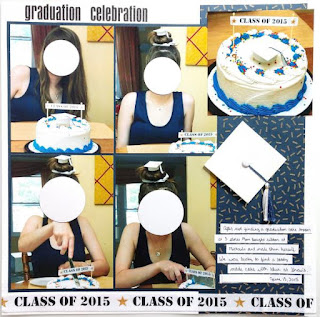
In the celebration layout, I used ribbon from the spool I used for a cake decoration and the top of the grad cap I had made from craft foam and used on her cake (and then she put in her hair. LOL)



Monday, January 31, 2022

With Honors

 A graduation layout.I used some old graduation cap paper. I hand-cut a shadow layer for the dicut title. The stamped sentiments on the right side are from a card I made but then never gave so I cut it up and used it on the layout instead.


Saturday, January 8, 2022

A couple of school themed layouts

I like to add a bit of memorabilia when I can. I made my daughter's dress and the purple heart I cut from a scrap of the leftover fabric. These pages were inspired by a couple of layouts that I turned into sketches.


Friday, December 10, 2021

Spreading her wings

 First day of college layout.


Thursday, December 9, 2021

Graduation layouts

 I try to include memorabilia on my layouts when I can if there is any. I used the design feature of the triangles to turn the bottom one into a pocket for the program.


Friday, August 31, 2018

layouts for August

I'm still working out how to edit my photos. I found a free online editor I could download (don't want anything cloud-based) but it doesn't let me quite do what I want/need to like my old Adobe. I ended up using MS Paint after doing my photo editing to go over the parts I don't share online. I could use circles over faces when I take the photos, but putting something over names is more of a pain. The editor also wouldn't let me save back to my SD card, I had to save them to my computer.


Wednesday, July 18, 2018

Class pictures

I'm on a new computer so I don't have my photoshop (which is super old) to fix up my photos so I'm figuring out how to do it. I tried paint at first (wish I could smudge and blur instead of paint over things I want to not show) so that's why all the markings. Then I tried to see if I could improve the brightness and stuff when I saw you can do it with the photo thing microsoft has. Next time I'm going to try and see if I can do it all with photo. I'm not even sure it automatically saved/replaced the other photo - they don't look much better.


Tuesday, January 9, 2018

Two layouts

The kitty page is based on a sketch from https://issuu.com/sgcreate/docs/create_-_issue_16_-_september_2015


Friday, January 5, 2018

sketch challenge LO's

From the July 2015 issue of Create  https://issuu.com/sgcreate/docs/create_-_issue_15_-_july_2015


Sunday, April 23, 2017

layouts for April

Having several pics that couldn't really be cut down made it harder to work with that I ended up working out a block design. It wasn't going to work out in the album to make a 2 pager. I wanted to keep it less crowded looking, and needing the space for journaling, I opted to not use any other papers and outlined my open spaces and gave each a subtitle with a stamp. And I was happy to remember to use my DC stamp set!


On this one the brochure serves as a title.
 
I decided to keep this one simple and not add a title really or any embellishments though I had toyed with the idea.

Sunday, June 5, 2016

Friday, January 20, 2012

Two more layouts

One was for a challenge (monochromatic, foam stamps, border punch) and the other was one I drew for myself with my layout inspiration generator. (analagous, heat embossing, journaling strips) I used chipboard negatives and heat embossed them.